Merchant Wallet Payouts
Merchant Wallet Payouts enable you to send transfers programmatically from your merchant wallet balance to supported beneficiary bank accounts using the PayIslands API.
PayIslands atomically reserves the payout amount and applicable fee, executes the payout asynchronously, and updates your wallet ledger upon completion.
Prerequisites
Before initiating a payout:
- Active Merchant Wallet: Your merchant account must have an active merchant wallet.
- Funded Balance: Your wallet must be funded through its assigned static account. A successful transfer into your assigned static account is automatically credited to your wallet and becomes available for payouts.
- Sufficient Available Balance: Your available balance must cover both the payout amount and the applicable fee (
total_debit_amount = payout amount + payout fee). - Supported Beneficiary Bank: You must use a supported beneficiary bank code.
- Supported Currency: Only
NGNpayouts are currently supported.
Base URL
API requests use the standard PayIslands base URL for your environment:
export PAYISLANDS_API_BASE_URL="https://ags.payislands.com"
Authentication
All public merchant payout API requests require your merchant secret key passed as a Bearer token in the Authorization HTTP header:
Authorization: Bearer <MERCHANT_SECRET_KEY>
Key authentication requirements:
- Merchant Secret Key Only: The merchant secret key is sufficient to authenticate API payout requests.
- Server-Side Security: The secret key must only be used from a secure server-side environment. It must never be embedded in browser or mobile client code, committed to source repositories, or exposed in client-facing logs.
export PAYISLANDS_MERCHANT_SECRET_KEY="your-merchant-secret-key"
Fee Schedule
Applicable payout fees are detailed on the PayIslands Pricing page.
The total wallet debit is calculated as:
total_debit_amount = amount + fee_amount
Merchants are encouraged to call the Quote endpoint (POST /api/v1/transactions/in/merchant-wallet/payouts/quote) prior to submitting a payout to confirm the exact fee and total debit amount.
Response Envelope
All API endpoints return standard PayIslands responses using this JSON envelope:
{
  "status": true,
  "message": "...",
  "data": {},
  "statusCode": 200
}
In error responses, status is false, data is null, and message describes the failure cause.
Public API Endpoints
1. Get a Payout Quote
POST /api/v1/transactions/in/merchant-wallet/payouts/quote
Calculates the fee and total wallet debit for a given payout amount. This endpoint is synchronous and does not reserve funds or initiate a transfer.
Request Body
| Field | Required | Type | Description |
|---|---|---|---|
amount | Yes | String | Positive decimal string with up to two decimal places (e.g. "100.00") |
currency | No | String | Defaults to "NGN"; only "NGN" is currently supported |
{
  "amount": "100.00",
  "currency": "NGN"
}
Response Example — HTTP 200
{
  "status": true,
  "message": "Fee calculated successfully",
  "data": {
    "amount": "100.00",
    "fee_amount": "10.00",
    "total_debit_amount": "110.00",
    "currency": "NGN"
  },
  "statusCode": 200
}
cURL Example
curl --request POST \
  "$PAYISLANDS_API_BASE_URL/api/v1/transactions/in/merchant-wallet/payouts/quote" \
  --header "Authorization: Bearer $PAYISLANDS_MERCHANT_SECRET_KEY" \
  --header "Content-Type: application/json" \
  --data '{
    "amount": "100.00",
    "currency": "NGN"
  }'
2. Get Supported Banks
GET /api/v1/transactions/bank
Retrieves the list of supported financial institutions and their corresponding bank codes for initiating payouts and resolving beneficiary account names.
Path and Query Parameters
None.
Response Example — HTTP 200
{
  "status": true,
  "message": "Bank Fetched successfully",
  "data": [
    {
      "id": 1,
      "name": "Access Bank",
      "bank_code": "044",
      "institution_code": "000014"
    },
    {
      "id": 2,
      "name": "GTBANK PLC",
      "bank_code": "058",
      "institution_code": "000013"
    }
  ],
  "statusCode": 200
}
Response Fields
| Field | Type | Description |
|---|---|---|
id | Integer | Unique identifier for the bank |
name | String | Full registered name of the financial institution |
bank_code | String | Bank code used for payout creation and name resolution |
institution_code | String | Standard NIP institution code |
cURL Example
curl --request GET \
  "$PAYISLANDS_API_BASE_URL/api/v1/transactions/bank" \
  --header "Authorization: Bearer $PAYISLANDS_MERCHANT_SECRET_KEY"
3. Resolve Beneficiary Account (Name Enquiry)
POST /api/v1/transactions/in/merchant-wallet/payouts/name-enquiry
Resolves and returns the beneficiary account name before submitting a wallet payout.
Recommended Integration Flow
- Retrieve bank codes from Get Supported Banks.
- Call name enquiry with the account number and bank code in the request body.
- Display the returned account name for confirmation.
- Submit the payout through the Create a Payout endpoint.
Request Body
| Field | Required | Type | Description |
|---|---|---|---|
account_number | Yes | String | Beneficiary account number containing only digits (10 numeric characters) |
bank_code | Yes | String | Code identifying the beneficiary's bank returned by the supported banks endpoint |
{
  "account_number": "0123456789",
  "bank_code": "058"
}
Response Example — HTTP 200
{
  "status": true,
  "message": "Account name resolved successfully",
  "data": {
    "account_name": "JOHN DOE",
    "account_number": "0123456789",
    "bank_code": "058",
    "reference": "MWNE1234567890"
  }
}
Merchants should use account_name only to display and confirm the intended beneficiary.
cURL Example
curl --request POST \
  "$PAYISLANDS_API_BASE_URL/api/v1/transactions/in/merchant-wallet/payouts/name-enquiry" \
  --header "Authorization: Bearer $PAYISLANDS_MERCHANT_SECRET_KEY" \
  --header "Content-Type: application/json" \
  --data '{
    "account_number": "0123456789",
    "bank_code": "058"
  }'
Failure Responses Examples
Invalid request — HTTP 400
{
  "status": false,
  "message": "Account number must contain only digits",
  "data": null,
  "statusCode": 400
}
Invalid or unsupported bank — HTTP 400
{
  "status": false,
  "message": "Beneficiary bank could not be resolved",
  "data": null,
  "statusCode": 400
}
Name enquiry unsuccessful — HTTP 400
{
  "status": false,
  "message": "Could not resolve beneficiary account name",
  "data": null,
  "statusCode": 400
}
Authentication failure — HTTP 401
{
  "status": false,
  "message": "Unauthorized",
  "data": null,
  "statusCode": 401
}
Temporary service failure — HTTP 503
{
  "status": false,
  "message": "Name enquiry is temporarily unavailable",
  "data": null,
  "statusCode": 503
}
Error Guidance
| HTTP Status | Meaning | Recommended Action |
|---|---|---|
200 | Account resolved successfully | Display the returned name and allow the merchant to continue. |
400 | Invalid account number, invalid bank code, or unresolved account | Correct the beneficiary details before retrying. |
401 / 403 | Authentication failed | Confirm that the appropriate API secret key credential is being used. |
503 | Name enquiry temporarily unavailable | Retry after a short delay. Do not submit a payout until the beneficiary is confirmed. |
Important Integration Notes
- No Payout Creation: The name enquiry endpoint does not create a payout.
- No Fund Reservations: The endpoint does not reserve or debit wallet funds.
- No Outcome Guarantee: A successful lookup does not guarantee that a subsequent payout will succeed.
- Independent Validation: A successful lookup does not replace payout submission validation. PayIslands independently validates the beneficiary again during payout processing.
- Do Not Submit
account_name: Merchants must not submit or trust anaccount_nameof their own. The create-payout request acceptsaccount_numberandbank_codeonly; it does not acceptaccount_name. - Do Not Cache Indefinitely: Merchants should not cache a resolved account name indefinitely.
- Provider-Agnostic: The merchant never selects or passes a payout provider.
4. Create a Payout
POST /api/v1/transactions/in/merchant-wallet/payouts
Validates the beneficiary account, reserves amount + fee_amount from the available wallet balance, and accepts the payout request for asynchronous processing.
Request Body Contract
| Field | Required | Type | Description |
|---|---|---|---|
account_number | Yes | String | Beneficiary bank account number (10 numeric characters) |
bank_code | Yes | String | Beneficiary bank code (e.g., "058") |
bank_id | No | Integer | Positive integer bank identifier |
amount | Yes | String | Positive decimal string with up to two decimal places |
currency | No | String | Defaults to "NGN"; only "NGN" is supported |
narration | No | String | Optional transfer description (maximum 255 characters) |
idempotency_key | Yes | String | Unique reference key for request deduplication (maximum 175 characters) |
{
  "account_number": "0123456789",
  "bank_code": "058",
  "amount": "1000.00",
  "currency": "NGN",
  "narration": "Vendor payment",
  "idempotency_key": "merchant-order-12345"
}
Response Example — HTTP 202 Accepted
{
  "status": true,
  "message": "Payout accepted for processing",
  "data": {
    "payout": {
      "id": 1842,
      "internal_reference": "MWPOexampleReference000001",
      "beneficiary": {
        "account_number": "0123456789",
        "account_name": "EXAMPLE BENEFICIARY",
        "bank_code": "058",
        "bank_name": "Example Bank"
      },
      "currency": "NGN",
      "amount": "1000.00",
      "fee_amount": "10.00",
      "total_debit_amount": "1010.00",
      "status": "reserved",
      "narration": "Vendor payment",
      "error_message": null,
      "created_at": "2026-09-18T10:00:00.000Z",
      "completed_at": null,
      "updated_at": "2026-09-18T10:00:00.000Z"
    },
    "duplicate": false
  },
  "statusCode": 202
}
[!IMPORTANT] An HTTP
202response indicates that the payout has been accepted for processing and funds have been reserved. It does not mean the beneficiary account has been credited. The initial status is normallyreserved.
cURL Example
curl --request POST \
  "$PAYISLANDS_API_BASE_URL/api/v1/transactions/in/merchant-wallet/payouts" \
  --header "Authorization: Bearer $PAYISLANDS_MERCHANT_SECRET_KEY" \
  --header "Content-Type: application/json" \
  --data '{
    "account_number": "0123456789",
    "bank_code": "058",
    "amount": "1000.00",
    "currency": "NGN",
    "narration": "Vendor payment",
    "idempotency_key": "merchant-order-12345"
  }'
5. List Payouts
GET /api/v1/transactions/in/merchant-wallet/payouts
Returns a paginated list of payouts for your merchant wallet, sorted in newest-first order.
Query Parameters
| Parameter | Required | Type | Description |
|---|---|---|---|
currency | No | String | Filter by currency; defaults to "NGN" |
page | No | Integer | Page number (defaults to 1) |
limit | No | Integer | Items per page (1 to 200, defaults to 50) |
status | No | String | Filter by status (reserved, processing, dispatched, ambiguous, successful, failed) |
from_date | No | String | Lower bound creation timestamp (ISO 8601 format) |
to_date | No | String | Upper bound creation timestamp (ISO 8601 format) |
reference | No | String | Search by internal reference or beneficiary details |
Response Example — HTTP 200
{
  "status": true,
  "message": "Merchant wallet payouts fetched successfully",
  "data": {
    "items": [
      {
        "id": 1842,
        "internal_reference": "MWPOexampleReference000001",
        "beneficiary": {
          "account_number": "0123456789",
          "account_name": "EXAMPLE BENEFICIARY",
          "bank_code": "058",
          "bank_name": "Example Bank"
        },
        "currency": "NGN",
        "amount": "1000.00",
        "fee_amount": "10.00",
        "total_debit_amount": "1010.00",
        "status": "successful",
        "narration": "Vendor payment",
        "error_message": null,
        "created_at": "2026-09-18T10:00:00.000Z",
        "completed_at": "2026-09-18T10:00:08.000Z",
        "updated_at": "2026-09-18T10:00:08.000Z"
      }
    ],
    "pagination": {
      "page": 1,
      "limit": 50,
      "total": 1,
      "total_pages": 1,
      "has_next_page": false,
      "has_previous_page": false
    }
  },
  "statusCode": 200
}
cURL Example
curl --get \
  "$PAYISLANDS_API_BASE_URL/api/v1/transactions/in/merchant-wallet/payouts" \
  --header "Authorization: Bearer $PAYISLANDS_MERCHANT_SECRET_KEY" \
  --data-urlencode "currency=NGN" \
  --data-urlencode "page=1" \
  --data-urlencode "limit=50" \
  --data-urlencode "status=successful"
6. Get Payout Details
GET /api/v1/transactions/in/merchant-wallet/payouts/:id
Retrieves detailed information for a single payout by its numeric ID.
Path Parameters
| Parameter | Required | Description |
|---|---|---|
id | Yes | Numeric payout ID returned during payout creation |
Response Example — HTTP 200
{
  "status": true,
  "message": "Payout details fetched successfully",
  "data": {
    "id": 1842,
    "internal_reference": "MWPOexampleReference000001",
    "beneficiary": {
      "account_number": "0123456789",
      "account_name": "EXAMPLE BENEFICIARY",
      "bank_code": "058",
      "bank_name": "Example Bank"
    },
    "currency": "NGN",
    "amount": "1000.00",
    "fee_amount": "10.00",
    "total_debit_amount": "1010.00",
    "status": "processing",
    "narration": "Vendor payment",
    "error_message": null,
    "created_at": "2026-09-18T10:00:00.000Z",
    "completed_at": null,
    "updated_at": "2026-09-18T10:00:05.000Z"
  },
  "statusCode": 200
}
cURL Example
curl --request GET \
  "$PAYISLANDS_API_BASE_URL/api/v1/transactions/in/merchant-wallet/payouts/1842" \
  --header "Authorization: Bearer $PAYISLANDS_MERCHANT_SECRET_KEY"
7. Requery Payout Status
POST /api/v1/transactions/in/merchant-wallet/payouts/:id/requery
Triggers a status check for a pending or ambiguous payout. Requery safely queries the current processing status without re-submitting the transfer.
Path Parameters
| Parameter | Required | Description |
|---|---|---|
id | Yes | Numeric payout ID returned during payout creation |
Response Example — HTTP 200 (Resolved to Success)
{
  "status": true,
  "message": "Payout completed successfully",
  "data": {
    "id": 1842,
    "internal_reference": "MWPOexampleReference000001",
    "beneficiary": {
      "account_number": "0123456789",
      "account_name": "EXAMPLE BENEFICIARY",
      "bank_code": "058",
      "bank_name": "Example Bank"
    },
    "currency": "NGN",
    "amount": "1000.00",
    "fee_amount": "10.00",
    "total_debit_amount": "1010.00",
    "status": "successful",
    "narration": "Vendor payment",
    "error_message": null,
    "created_at": "2026-09-18T10:00:00.000Z",
    "completed_at": "2026-09-18T10:01:00.000Z",
    "updated_at": "2026-09-18T10:01:00.000Z"
  },
  "statusCode": 200
}
[!NOTE] If status reconciliation is still ongoing or inconclusive, requery returns HTTP
202withstatus: "ambiguous". The payout remains pending.
cURL Example
curl --request POST \
  "$PAYISLANDS_API_BASE_URL/api/v1/transactions/in/merchant-wallet/payouts/1842/requery" \
  --header "Authorization: Bearer $PAYISLANDS_MERCHANT_SECRET_KEY"
Idempotency
To prevent duplicate transfers caused by network timeouts or retries, every payout request requires an idempotency_key (maximum 175 characters). The key is scoped to your merchant wallet.
- Identical Retries: Submitting the same
idempotency_keywith identical payout parameters returns the original payout object with"duplicate": trueand HTTP status202. - Key Conflicts: Submitting the same
idempotency_keywith different payout parameters returns HTTP409 Conflict. - Handling Network Errors: If a request times out or disconnects before receiving a response, do not generate a new idempotency key. Instead, retry the request using the same
idempotency_keyor call the Get Payout Details / List Payouts endpoint to check the transaction status.
{
  "status": true,
  "message": "Payout request already accepted",
  "data": {
    "payout": {
      "id": 1842,
      "internal_reference": "MWPOexampleReference000001",
      "status": "reserved",
      "amount": "1000.00",
      "fee_amount": "10.00",
      "total_debit_amount": "1010.00"
    },
    "duplicate": true
  },
  "statusCode": 202
}
Payout Lifecycle & Asynchronous Statuses
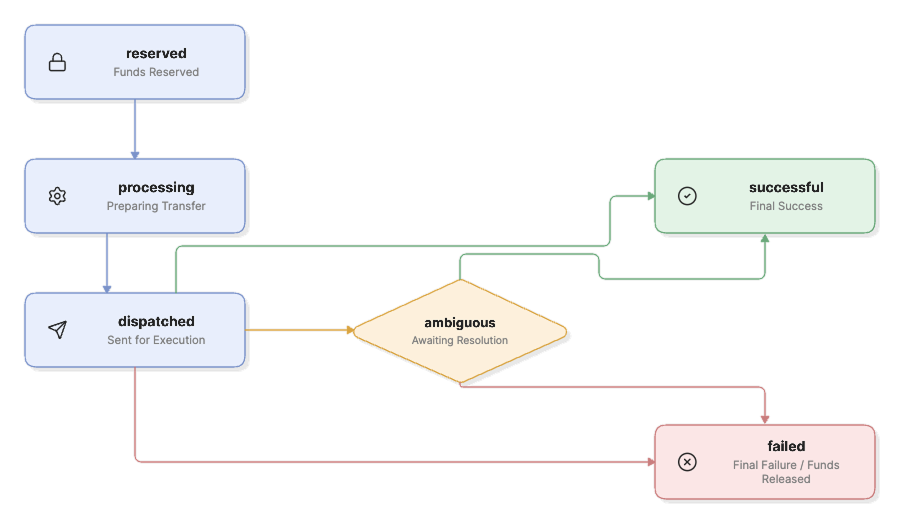
Payout execution is asynchronous. A payout transitions through the following lifecycle states:
Lifecycle Status Definitions
| Status | Meaning | State Type |
|---|---|---|
reserved | Payout amount + fee reserved from available balance. Execution pending. | Pending |
processing | Payout is queued and preparing for transfer dispatch. | Pending |
dispatched | Payout has been sent for transfer processing. | Pending |
ambiguous | Outcome is not yet definitive. Funds remain safely reserved. | Pending |
successful | Beneficiary transfer confirmed. Reserved funds captured. | Final |
failed | Transfer failed definitively. Reserved funds released back to available balance. | Final |
Status Handling Guidelines
- Final States: Only
successfulrepresents final success. Onlyfailedrepresents final failure. - Pending States: Treat all other statuses (
reserved,processing,dispatched,ambiguous) as pending. - Do Not Duplicate: Never create a replacement payout while an existing payout is pending or ambiguous.
- Status Checks: Poll the details endpoint (
GET /api/v1/transactions/in/merchant-wallet/payouts/:id) or trigger a status requery (POST /api/v1/transactions/in/merchant-wallet/payouts/:id/requery) to monitor pending payouts.
Wallet and Ledger Balance Effects
PayIslands maintains strict ledger accountability for all wallet payout operations:
1. Payout Initiation & Reservation
When a payout is submitted, total_debit_amount (amount + fee_amount) is deducted from your available balance and added to your reserved balance.
2. Successful Payout
When a payout achieves successful status:
- The reserved funds are captured.
- A final payout debit ledger entry is recorded for the principal amount and fee.
3. Definitive Failure
When a payout encounters a definitive failed status:
- The reserved funds are immediately returned to your available balance.
- A
payout_reversalledger entry is recorded.
4. Ambiguous Status
If a transfer outcome is temporarily inconclusive (ambiguous):
- Funds remain in reserved balance until final status resolution.
- Funds are neither released nor charged twice while awaiting confirmation.
Troubleshooting & Error Handling
Common HTTP response codes and error scenarios:
| HTTP Status | Error Message / Cause | Solution |
|---|---|---|
400 | Merchant wallet is not active | Ensure your merchant wallet has been activated. |
400 | Insufficient available wallet balance | Top up your merchant wallet via your assigned static account to cover principal + fee. |
400 | Only NGN payouts are currently supported | Specify NGN or omit the currency field. |
400 | Beneficiary bank could not be resolved | Verify bank_code and account_number. |
401 | Invalid or missing secret key | Ensure Authorization: Bearer <MERCHANT_SECRET_KEY> header is included and valid. |
404 | Payout record not found | Verify the payout ID and ensure it belongs to your merchant account. |
409 | Idempotency key has already been used for a different payout request | Use a unique idempotency key for distinct payouts, or send matching payload details. |
409 | Payout is not eligible for status requery | Requery is only applicable while payouts are in pending or ambiguous states. |
Security Best Practices
- Keep Secret Keys Server-Side: Always store and use your
MERCHANT_SECRET_KEYon secure backend servers. Never expose it in web browsers, mobile apps, or client-side code. - Never Expose Credentials in Logs: Ensure secret keys and Authorization headers are masked in application logs.
- Use Idempotency Keys: Generate a unique, deterministic idempotency key for every distinct logical payout.
- Handle Network Disruptions Safely: Always verify existing payout status via Get Payout Details or Requery before retrying failed network calls.